Your Veli account is where you have full control over what your dog gets and when. Below we show you, step by step, how to sign in and how to change your box, your delivery date or how often deliveries come in just a few clicks. At the end you will find a short tour of the other tabs in your account.
Where your account comes from
You don’t need to set anything up or think of a password. Your Veli account is created automatically with your first order, when you build your bundle. It is linked to the e-mail address you gave with the order, and that address is your key to signing in.
How to sign in
Go to velipet.com and click “Log in”. Then choose your route depending on the kind of e-mail address you have. The screenshots in this guide show sample data; in your own account you will see your own.
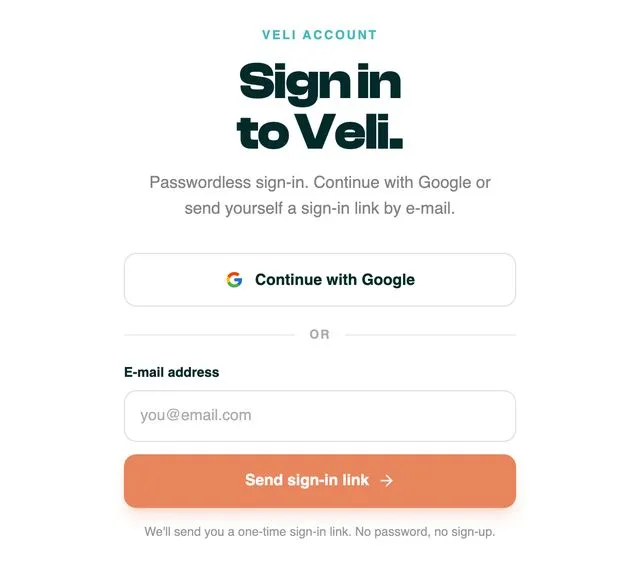
Have a Google account? Sign in with one click
If the e-mail address given with your order is a Google account, for example Gmail, click “Continue with Google”. It is the quickest and easiest route, which is why we recommend it. You don’t have to wait for any message.
A different e-mail address? Sign in with a code
- Type in your e-mail address and click “Send sign-in link”.
- Check your inbox. Our message contains a sign-in link and a code.
- On the sign-in page, type the code into the “Enter the code from the e-mail” field and click “Sign in with code”.
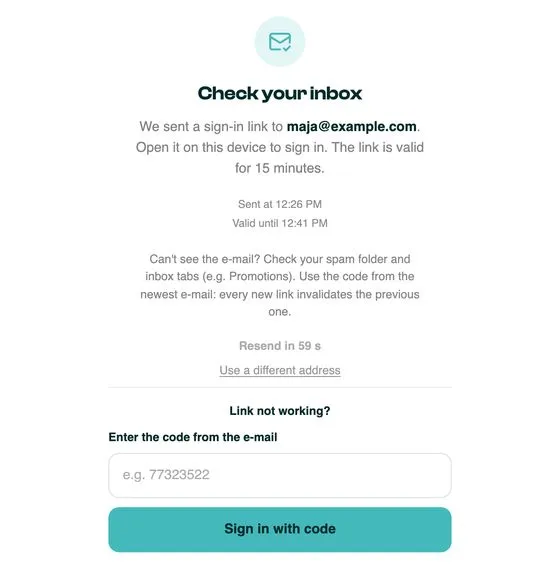
The code also works when you read your e-mail on a different device from the one you are signing in on, for example when the message is on your phone and you open your account on a computer.
How to manage your subscription
This is the most important part of your account. In the “Subscription” tab you will see what is in your next delivery, the plan for the deliveries after it and every management option in one place. The buttons you will use most often are also right there on your account’s start page.
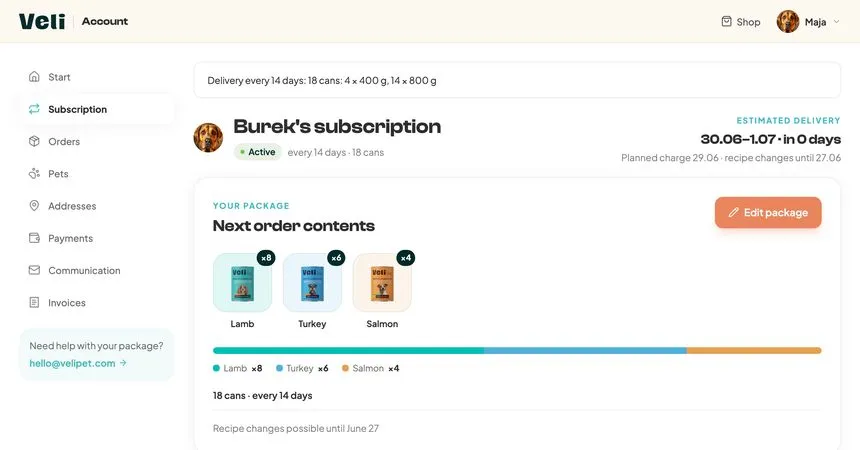
Look out for the note “Recipe changes possible until…”. It is the last moment to change your next box. After that date, your changes will apply from the following delivery.
Edit package
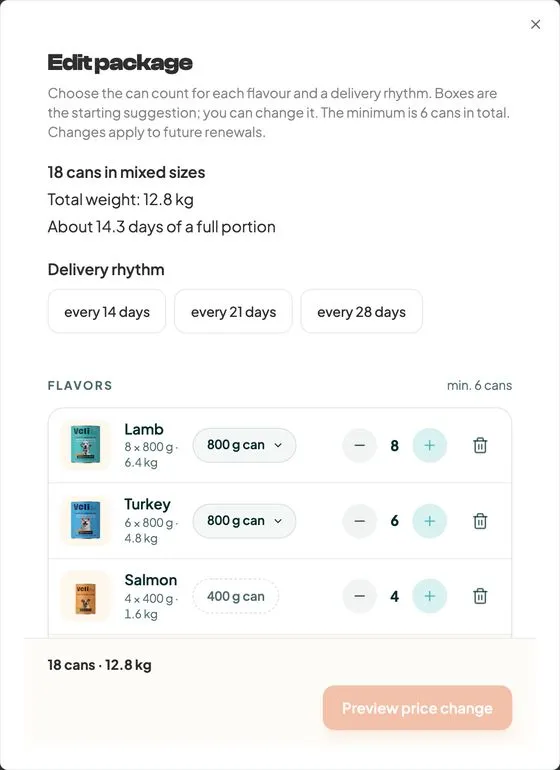
Want to change the flavours, the number of cans or how often deliveries come? Click “Edit package”. In one window you can set:
- the length of your plan, meaning how often a delivery arrives: every 14, 21 or 28 days,
- your flavour mix, meaning how many cans of each recipe go into the box,
- can sizes, if you want a different can size for particular flavours.
Finally, click “Preview changes”, check the summary and confirm.
Change date
Going away, or still have food left? Click “Change date” and pick a new day for your next order. Payment and dispatch move with it, while orders that are already paid for or being prepared stay as they are.
Skip next order
If you only want to miss one delivery, choose “Skip next order”. Your next box won’t come, and the one after it will arrive as planned.
Pause deliveries
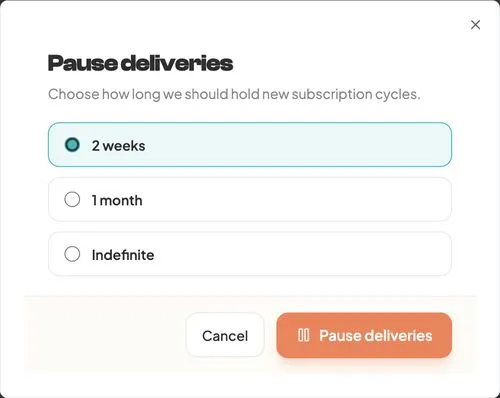
Need a longer break? Click “Pause deliveries” and choose how long for: 2 weeks, 1 month or indefinitely. Your box and settings are saved, and you can restart deliveries with the “Resume” button.
Change delivery address
Moving house, or want a delivery sent somewhere else? In the “Subscription” tab click “Change delivery address” and choose the address your next boxes should go to. You can add a new address in the “Addresses” tab.
Cancel subscription
You can cancel at any time, with no fees and no notice period. In the “Subscription” tab click “Cancel subscription”. Before you cancel, we will show you some gentler options, such as a pause or skipping one delivery, because sometimes that is all you need. If you still want to cancel, tick a reason and confirm.
What else you will find in your account
When you sign in, you land on the “Start” tab with a summary: your next delivery, your payment status and your latest order. On the left you have a menu with the other tabs:
| Tab | What you will find there |
|---|---|
| Start | a quick overview of everything that matters |
| Subscription | what is in your box, the delivery plan and every management option |
| Orders | order history, shipment tracking and invoices |
| Pets | your dog’s profile: breed, weight, age, allergies |
| Addresses | delivery and billing addresses |
| Payments | the payment method for your next deliveries |
| Communication | consents and contact preferences, including the newsletter |
| Invoices | sales documents to download |
Orders. When you expand an order, you will see its status, from payment to delivery, a “Track shipment” link and an invoice to download.
Pets. This is your dog’s profile: breed, weight, age and allergies. Keep it up to date, because we use it to match the food to your dog’s needs. This is also where you add another dog.
Addresses and Payments. Your saved delivery and billing addresses and the payment method for your next deliveries, for example BLIK or a card. We don’t store your full card details; payments are handled by a licensed payment provider.
Invoices. All your sales documents in one place, ready to download. This is also where you can ask for an invoice correction.
Communication. This is where you manage your consents, including consent to our marketing newsletter with news and feeding advice.
Got a question?
Something doesn’t look right, or you can’t find something? Write to hello@velipet.com, ideally with your order number. You can read more about delivery rules, the starter package and discounts in our guide to how the Veli subscription works.
Frequently asked questions
How do I create a Veli account?
You don’t need to. Your account is created automatically with your first order and is linked to the e-mail address you give at that point.
I can’t remember my password. What should I do?
Your Veli account has no password. If you have a Google account, click “Continue with Google”. With any other e-mail address, type it in, click “Send sign-in link” and sign in with the code from our message.
The code from the e-mail doesn’t work. Why?
The code and the link are valid for 15 minutes, and every new message cancels the previous one. Use the code from the latest e-mail or ask for a new one. If the message hasn’t arrived, check your Spam folder and the Promotions tab.
Until when can I change my next box?
Until the date shown in your account next to “Recipe changes possible until…”. After that date, your changes will apply from the following delivery.
Is it worth signing up for the newsletter?
Yes. People who have agreed to receive our newsletter get news about gifts and discount codes from us every few deliveries. You can switch this consent on in the “Communication” tab.